Picking Your LLM Without the Hype
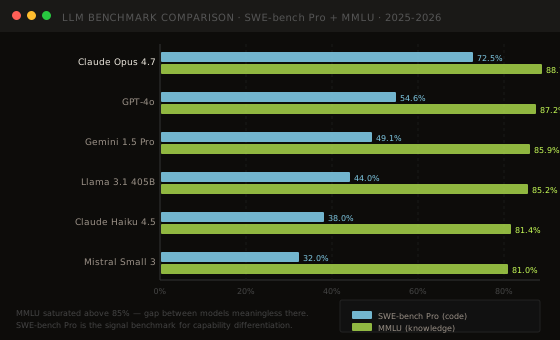
MMLU is saturated. Every frontier model scores above 85% on it now, which makes the 1.5-point gap between GPT-4o and Gemini on MMLU completely meaningless. If you're using MMLU to pick a model, you're optimising on noise.
Here's how to actually evaluate and pick an LLM for a production use case.
The benchmark problem
There are two categories of benchmarks: the ones that discriminate and the ones that don't anymore.
MMLU (Massive Multitask Language Understanding) — 57 subjects, multiple choice. Useful for seeing if a model has general knowledge, but once models cross 85% it stops differentiating. All frontier models are above 86%.
SWE-bench Pro — real GitHub issues that require writing and running code to fix. This is the clean benchmark right now. It's harder to game (requires actual execution), and the gap between models is meaningful: Claude Opus 4.7 at 72.5%, GPT-4o at 54.6%, Llama 3.1 405B at 44.0%.
HumanEval — code generation. Largely saturated for frontier models (GPT-4o: 90.2%, Claude: 91.5%). Useful only for comparing smaller/fine-tuned models.
Actual task benchmarks beat all of these. The right benchmark is your task. Build a golden set of 100–500 examples from your actual use case, label expected outputs, and run all candidate models. This takes half a day and gives you more signal than any public benchmark.
The latency benchmark most people skip
TTFT (Time to First Token) varies dramatically across models and providers. For user-facing applications, this is the metric that determines perceived responsiveness.
| Model | Provider | TTFT p50 | Throughput | |---|---|---|---| | Llama 3.1 70B | Groq | ~80ms | 716 tok/s | | GPT-4o | Azure OAI | ~200ms | ~100 tok/s | | Claude Sonnet 4.6 | Bedrock | ~250ms | ~80 tok/s | | Gemini 1.5 Pro | Vertex | ~180ms | ~120 tok/s | | Llama 3.1 70B | Together | ~150ms | ~200 tok/s |
The model choice and the provider choice interact. Groq's Llama 3.1 70B at 80ms TTFT feels instant. The same model elsewhere at 300ms TTFT feels slow. Don't evaluate the model in isolation from where it will run.
Context window: effective vs advertised
Every model advertises a context window. What they don't advertise is the effective limit — the point where attention degrades and retrieval accuracy drops.
The "lost in the middle" problem: models retrieve information from the beginning and end of long contexts reliably. Content buried in the middle of a 128K context has meaningfully worse retrieval accuracy. This is well-documented (Liu et al., 2023) and hasn't fully disappeared in more recent models.
Practical limits by model family:
- Claude models: effective up to ~100K tokens with relatively stable recall (longest tested)
- GPT-4o (128K): accuracy drops noticeably past 50–60K in most evaluations
- Gemini 1.5 Pro (1M): has the longest window, but at 200K+ latency and cost dominate; treat 100K as the practical ceiling
- Llama 3.1 (128K): similar to GPT-4o pattern
This matters for RAG design: don't assume you can pass all 50 retrieved chunks to the model. Pick 5–10 high-quality chunks, not 50 mediocre ones.
The fine-tune vs RAG vs few-shot question
This comes up constantly and most teams get it backwards.
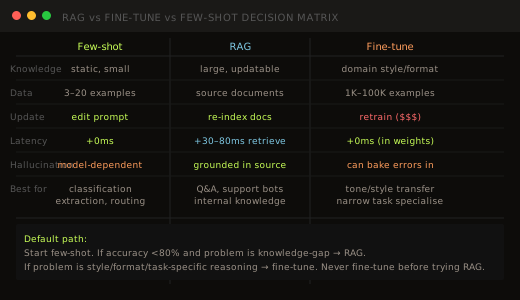
Few-shot prompting is the right starting point. Zero infra, instant iteration. Works for classification, extraction, routing tasks where you can show 3–20 examples of the correct behaviour in context. If your accuracy problem is solvable with 10 good examples in the system prompt, stop there.
RAG is for knowledge gap problems — the model doesn't know your domain's documents, product catalog, or internal policies. Fine-tuning doesn't fix this; a fine-tuned model still hallucinates facts it wasn't trained on. RAG grounds the model in your actual source material.
Fine-tuning is for style, format, and narrow task specialization. If you need the model to output a specific JSON schema consistently, classify into a proprietary taxonomy, or match a very specific writing style — fine-tuning is the right lever. It's expensive to maintain (every model update requires re-tuning), so be sure the problem can't be solved with a good system prompt first.
The biggest mistake: fine-tuning a model because "it doesn't know our domain." That's a RAG problem. Fine-tuning teaches the model how to behave, not what to know. A fine-tuned model that hallucinates is worse than a RAG model that says "I don't have information about that."
Picking the right model tier
Frontier models (Claude Opus 4.7, GPT-4o, Gemini Ultra): best reasoning, highest cost. Right for tasks where accuracy directly drives business value — contract review, medical summarization, complex code generation.
Mid-tier models (Claude Sonnet 4.6, GPT-4o mini, Gemini 1.5 Pro): good accuracy/cost tradeoff. Most chatbot and RAG workloads live here.
Small/fast models (Claude Haiku 4.5, Llama 3.1 8B, Mistral Small 3): for classification, routing, extraction, and tasks where sub-200ms response matters more than frontier accuracy. Using Claude Opus to classify a support ticket into one of 8 categories is expensive overkill.
The routing pattern: use a small model (Haiku/Mistral) to classify query complexity, then route to small or large model accordingly. This is how Intercom and similar companies run LLM workloads at scale — the expensive model fires only when the small one can't handle it.
Pricing as of May 2026
| Model | Input /1M | Output /1M | Context | |---|---|---|---| | Claude Opus 4.7 | $15.00 | $75.00 | 200K | | Claude Sonnet 4.6 | $3.00 | $15.00 | 200K | | Claude Haiku 4.5 | $0.80 | $4.00 | 200K | | GPT-4o | $2.50 | $10.00 | 128K | | GPT-4o mini | $0.15 | $0.60 | 128K | | Gemini 1.5 Pro | $1.25 | $7.00 | 1M | | Gemini 1.5 Flash | $0.075 | $0.30 | 1M | | Llama 3.1 405B | $3.00 | $3.00 | 128K | | Llama 3.1 70B | $0.90 | $0.90 | 128K | | Mistral Small 3 | $0.10 | $0.30 | 32K |
Llama pricing is at Together.ai; proprietary models at their respective providers.
Practical evaluation checklist
Before committing to a model for production:
- Build a golden set — 100–500 real queries from your domain, labelled expected outputs
- Test on task accuracy — don't use public benchmarks as the signal
- Measure TTFT — on the actual provider, not the model card
- Test context degradation — put important info at position 50% in a long prompt and see if the model still retrieves it
- Test edge cases explicitly — refusals, ambiguous inputs, jailbreak attempts if relevant
- Cost model at your expected volume — estimate monthly API spend before you commit
The model that tops a leaderboard is rarely the model that's right for your use case. The right model is the one that scores best on your golden set at a cost that makes sense.