Stop Picking the Smartest OCR Model. Pick the Right One.
A finance team needs to read ten thousand invoices a month. A hospital records team needs to digitize handwritten lab reports. Both reach for the same instinct: grab the smartest model available and point it at the documents. Claude, GPT-4o, whatever's newest this quarter.
That instinct is usually wrong, and not because the smartest model is bad at reading. It's because "smartest" and "right for this job" are different questions, and the gap between them shows up directly on your monthly bill.
This is a decision guide, not a leaderboard. Which tool for which documents, what it actually costs at volume, and where a cheap verification step matters more than which model you picked in the first place.
The Four Real Options
Four categories exist, and picking the wrong one is usually a cost mistake more than an accuracy mistake.
Vision-language models — Claude, GPT-4o/5, Gemini's multimodal models — read a document the way a person would: layout, context, messy formatting, reasoning about what a field probably means even when it's not labeled clearly. Claude's PDF support converts each page to an image and extracts its text simultaneously, then feeds both to the model together. Anthropic's own docs are explicit about the tradeoff: Claude "might hallucinate or make mistakes when interpreting low-quality, rotated, or very small images," and spatial output is "approximate" and should be verified. GPT-4o offers Structured Outputs for schema-conformant JSON, though that feature isn't supported together with vision in the Assistants API.
Dedicated pipeline OCR — PaddleOCR, MinerU, docTR, Tesseract if you're self-hosting; AWS Textract, Google Document AI, or Azure AI Document Intelligence if you want a managed service. Built specifically to pull structured fields out of printed, reasonably well-formatted documents. Far cheaper per page, deterministic output, nothing to reason about.
Specialized cloud parsers — a step narrower than general OCR: AWS Textract's AnalyzeExpense, Google's Invoice and Expense processors, Azure's health-insurance-card model. Pre-trained on exactly one document type, so out-of-the-box accuracy on that type is usually higher than a general-purpose parser.
And one to rule out immediately: Google's Nano Banana Pro (Gemini 3 Pro Image) is not a document reader. It's an image generation and editing model, built to render legible text into a picture you're creating, not extract text from a document someone hands it. Google's own materials are explicit about this: it's built for "context-rich visuals" and studio-quality image editing, not for analyzing an existing document. If you're picking a tool for OCR, this isn't one of the four real options. Worth saying plainly because it's an easy name to reach for by mistake when a launch is fresh in the news.
What Each One Actually Costs
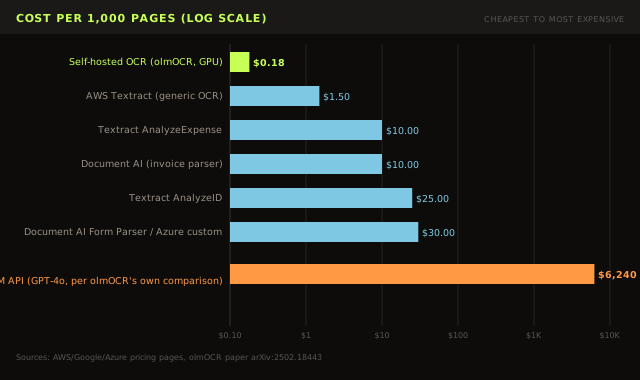
Here's where the decision usually actually gets made, whether people admit it or not:
| APPROACH | COST PER 1,000 PAGES |
|---|---|
| Self-hosted OCR (olmOCR, rented GPU) | ~$0.18 |
| AWS Textract, generic OCR (DetectDocumentText) | $1.50 |
| AWS Textract, AnalyzeExpense (invoices/receipts) | $10.00 |
| Google Document AI, Invoice/Expense parser | ~$10.00 |
| AWS Textract, AnalyzeID | $25.00 |
| Document AI Form Parser / Azure custom extraction | $30.00 (drops to $20 above 1M/month) |
| Frontier VLM API (GPT-4o, per olmOCR's own cost comparison) | $6,240+ |
That's not a small gap. Self-hosted open-source OCR and a frontier vision-language model API can differ by more than 30x on the same million pages, per olmOCR's own published comparison. The dedicated cloud services sit in between, and the extra cost over generic OCR mostly buys you a parser that's already tuned to your document type, instead of you building the field-extraction logic yourself.
None of this means always pick the cheapest option. It means know what you're paying for "reads any layout, any handwriting, any language" before you pay for that capability on every single page, when maybe only 10% of your documents actually need it.
The Handwriting Exception
There's one case where paying more is worth it without much debate: handwriting. On OmniDocBench, the CVPR 2025 document-parsing benchmark, pipeline tools that dominate everywhere else collapse on handwritten pages — MinerU's edit distance goes from strong on printed text to 0.984 on handwriting, where 0 is a perfect match and anything near 1 means the output is close to unusable. General vision-language models like Qwen2-VL (0.298) and InternVL2 (0.226) stay meaningfully more usable on the same handwritten samples.
If your documents are handwritten clinical notes, prescriptions, or hand-filled forms, don't bother benchmarking the cheap option. Route those to a vision-language model and save the dedicated OCR pipeline for everything printed.
Vendor Numbers Lie, Run Your Own Test
Treat every vendor-published accuracy number as a claim to verify on your own documents, not a fact. Reducto built an independent benchmark, RD-FormsBench, specifically because vendor numbers didn't hold up: Mistral OCR reported 94.9% on its own benchmark but scored only 45.3% on Reducto's harder, more diverse test set — handwriting, multiple languages, checkboxes, complex layouts — while Gemini 2.0 Flash scored 80.1% on that same independent set. The documented failure modes are the interesting part: Mistral misclassified tables as images, dropped headers and footers, hallucinated table columns that didn't exist, and misread strings like "JZP-110" as "I2P-110."
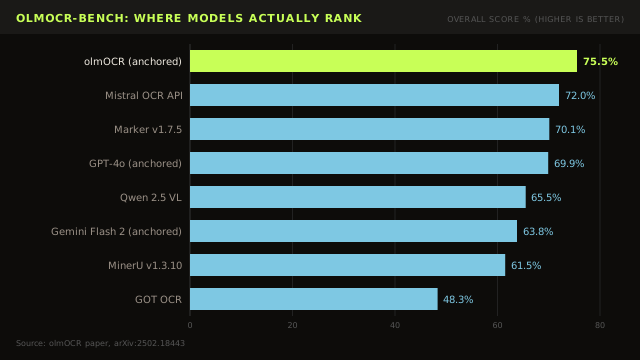
A benchmark you didn't run on your own documents is a marketing claim wearing a lab coat. Before you commit a budget line to any of the options above, pull twenty of your actual documents, and check the output by hand.
One Team's Hallucination Fix, In Two Releases
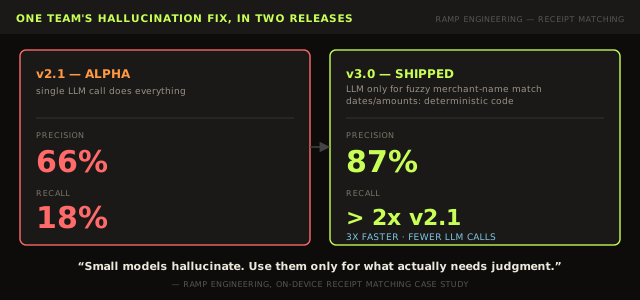
Picking the right tool isn't only about which vendor you choose. It's also about not asking one model to do a job better split across two approaches.
Ramp's engineering team published a useful failure story about their on-device receipt-matching feature. Version 2.0 used Apple's on-device FoundationModels API to match receipt text to card transactions in a single LLM call — merchant, date, amount, all handled by one prompt. The small on-device model hallucinated, and precision and recall both tanked. Version 2.1 tried chain-of-thought prompting split across multiple calls and still landed at 66% precision, 18% recall in testing.
Version 3.0 changed the architecture instead of the prompt. Dates and amounts — anything a deterministic pattern-matching API could extract reliably — moved out of the LLM entirely and into plain code. The LLM's job shrank down to the one sub-task that actually needed judgment: fuzzy merchant-name matching, where "AMZN Mktp US*2K3RT" and "Amazon" are the same thing and no regex will convince you otherwise. The result: 87% precision, recall more than doubled, and the whole pipeline ran 3x faster because it made fewer LLM calls per receipt.
The team's own summary: "Small models have a tendency to hallucinate." The fix wasn't a bigger model or a better prompt. It was recognizing that most of the task didn't need a model at all, and paying for one only on the narrow slice that actually needed judgment.
Whichever You Pick, Verify What It Reads
No matter which of the four options you land on, the output still needs a check before you trust it. A handful of patterns hold up in production:
Checksum and total validation. Line items must sum to the subtotal, sub-taxes must sum to total tax, subtotal plus tax must equal the total. Nanonets builds this directly into its invoice extraction schema as a default rule. Costs nothing beyond arithmetic.
LLM-as-judge, with a calibration caveat. A second model scoring whether an extracted field looks right handles fuzzy formatting differences an exact-string comparison would wrongly flag. But current models are well documented to overestimate their own confidence — a model claiming 95% certainty is commonly closer to 60–75% accurate in practice. A pipeline that naively trusts a self-reported confidence score is trusting a number the model itself gets wrong.
Consensus entropy. A more elegant, training-free technique: run the same document through multiple vision-language models and measure how much they agree. Correct extractions tend to converge; errors tend to diverge in different, model-specific ways. A 2026 paper on this approach (arXiv:2504.11101) reports a 42.1% F1 improvement over VLM-as-judge for unsupervised OCR quality verification, without needing any labeled ground truth.
Visual grounding. Every extracted field gets cited back to its exact bounding-box location in the source document, so a human reviewer looks at a highlighted rectangle instead of hunting through the whole page. Mercury, the fintech banking platform, evaluated raw foundation-model APIs and AWS Textract for onboarding-document verification and rejected both before landing on a grounded-extraction vendor, reporting 98% accuracy on edge cases once tuned.
One caveat worth sitting with: constrained decoding, forcing model output into valid JSON that matches your schema, solves the syntax problem, not the truth problem. Structured-output benchmarks have found models clearing 84%+ on schema validity while no model exceeds roughly 80% on whether the values inside that valid JSON are actually correct. Schema validation catches malformed output. It does not catch a plausible, wrong number sitting in a field shaped exactly the way you asked for.
If you want to see how a given per-field accuracy translates into document-level error rate at your own volume, here's a small calculator:
Finance: Match the Tool to the Reconciliation
For high-volume, standardized documents — invoices from repeat vendors, receipts, standard forms — a managed cloud parser is usually the right call over a frontier VLM. Three-way matching (invoice against purchase order against goods-receipt note) is the standard accounts-payable reconciliation pattern, and it works the same regardless of which extraction tool feeds it. In India specifically, GST reconciliation tools validate extracted invoices against GSTR-2B across six parameters with tolerance-based fuzzy matching, absorbing rounding and transposition differences rather than flagging every cent of drift.
Fraud detection increasingly gets folded directly into the extraction step rather than bolted on afterward: flagging altered documents, inconsistent metadata, or a vendor's bank account changing between invoices, the classic business-email-compromise pattern where everything about an invoice looks legitimate except the payment destination.
One number worth knowing before you pick a tool purely on price: extraction errors don't degrade every domain equally. A 2024 study measuring how OCR errors cascade into downstream retrieval-augmented pipelines found finance documents show the steepest retrieval-performance degradation of any domain tested — 59.7% on clean ground-truth text, falling to 36.4% once the same documents were run through a real OCR pipeline first. Legal documents, tested in the same study, degraded far less, 81.2% down to 71.0%. Finance data is uniquely unforgiving of OCR noise: dense numbers, tight tables, and formatting differences that fully change meaning with a single misread digit. Worth paying for the better tool on your highest-value documents even if the cheap tool is fine for the rest.
Healthcare: Compliance Usually Decides Before Accuracy Does
Healthcare is the clearest case where the "which tool" decision gets made before anyone looks at an accuracy table. Data residency and HIPAA requirements frequently rule out sending scans to a third-party API at all, which pushes the decision toward self-hosted OCR regardless of whether a cloud VLM would technically score higher on a benchmark.
Where cloud or hybrid setups are permitted, a peer-reviewed pipeline for digitizing paper lab reports combines OCR with an information-extraction module that pulls test name, result, unit, and reference range, then cross-references each result against its reference range to flag out-of-range values for clinical review. The study reports 0.93 average OCR text accuracy and an F1 of 0.86 on the overall extraction task, numbers honest enough that reference-range cross-checking is treated as necessary, not optional.
A separate, more recent implementation study extracting structured data from radiology reports reports concrete production numbers that are rare to find in this space: a median field-level accuracy of 98.1% across 424 MRI reports, and a production run of 1,800 prostate MRI reports completing at 100%, 8.9 seconds per report, and $0.009 per report.
For prescriptions specifically, deterministic drug databases, RxNorm and the FDA's National Drug Code directory, serve as a hard guardrail against hallucinated drug names, dosages, or forms, independent of which extraction tool produced the initial read.
The strongest single verification finding in healthcare comes from Stanford's VeriFact system, which combines retrieval-augmented generation with an LLM-as-judge to check whether every statement in an LLM-generated clinical note is actually supported by the patient's electronic health record. VeriFact achieved 92.7% agreement with a denoised, clinician-adjudicated ground truth, higher than the 88.5% agreement measured between individual clinicians reviewing the same notes. Google Cloud's own healthcare-AI documentation flags that generative AI validation for clinical extraction is "still an emerging practice," and that clinicians may over-trust AI output relative to their own judgment, worth remembering regardless of which tool sits upstream.
Building the Loop
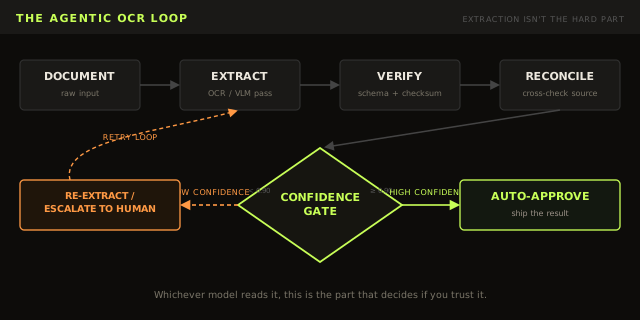
Here's the minimal version of a verification layer in Python, sitting on top of AWS Textract's AnalyzeExpense API, one of the cheaper specialized options from the table above. Textract's own Confidence score only tells you how sure it is about the pixels. It says nothing about whether the invoice's arithmetic is internally consistent.
"""
Agentic OCR verification layer for invoice/receipt processing.

AnalyzeExpense will happily hand you a confidently-wrong number — Textract's
Confidence score only reflects how sure it is about the pixels, not whether
the invoice's arithmetic is internally consistent. This adds a reconciliation
pass on top of extraction: do the line items sum to the subtotal, does
subtotal + tax equal the total, and is every field involved confident enough
to trust without a human.
"""

import re
from dataclasses import dataclass, field
from typing import List, Optional, Tuple

CONFIDENCE_THRESHOLD = 90.0  # Textract Confidence is 0-100
TOLERANCE = 0.02             # cents-level rounding slack


@dataclass
class VerificationResult:
    verdict: str  # "AUTO_APPROVE" | "FLAG_FOR_REVIEW"
    reasons: List[str] = field(default_factory=list)


def extract_expense(textract_client, bucket: str, key: str) -> dict:
    """Run AnalyzeExpense and return the first ExpenseDocument."""
    # assumes textract_client and S3 bucket already configured
    response = textract_client.analyze_expense(
        Document={"S3Object": {"Bucket": bucket, "Name": key}}
    )
    return response["ExpenseDocuments"][0]


def _parse_amount(text: str) -> Optional[float]:
    """Textract returns amounts as display strings like '$1,234.56'."""
    cleaned = re.sub(r"[^\d.]", "", text or "")
    try:
        return float(cleaned)
    except ValueError:
        return None


def _summary_field(expense_doc: dict, field_type: str) -> Tuple[Optional[float], float]:
    """Find a SummaryFields entry by its standardized Type (e.g. 'TOTAL')."""
    for f in expense_doc["SummaryFields"]:
        if f["Type"]["Text"] == field_type:
            vd = f["ValueDetection"]
            return _parse_amount(vd["Text"]), vd["Confidence"]
    return None, 0.0


def _line_item_prices(expense_doc: dict) -> List[Tuple[float, float]]:
    """Pull (amount, confidence) for the PRICE field of every line item."""
    prices = []
    for group in expense_doc["LineItemGroups"]:
        for item in group["LineItems"]:
            for f in item["LineItemExpenseFields"]:
                if f["Type"]["Text"] == "PRICE":
                    amount = _parse_amount(f["ValueDetection"]["Text"])
                    if amount is not None:
                        prices.append((amount, f["ValueDetection"]["Confidence"]))
    return prices


def verify_expense(expense_doc: dict) -> VerificationResult:
    """Reconcile extracted totals and confidence-gate before auto-approval."""
    reasons: List[str] = []

    subtotal, subtotal_conf = _summary_field(expense_doc, "SUBTOTAL")
    tax, tax_conf = _summary_field(expense_doc, "TAX")
    total, total_conf = _summary_field(expense_doc, "TOTAL")
    line_items = _line_item_prices(expense_doc)

    if subtotal is None or total is None:
        reasons.append("Missing SUBTOTAL or TOTAL field")
    else:
        tax_amount = tax or 0.0  # not every receipt breaks out tax
        if abs((subtotal + tax_amount) - total) > TOLERANCE:
            reasons.append(f"subtotal + tax != total ({subtotal} + {tax_amount} != {total})")

    if subtotal is not None and line_items:
        line_item_sum = sum(amount for amount, _ in line_items)
        if abs(line_item_sum - subtotal) > TOLERANCE:
            reasons.append(f"line items sum to {line_item_sum}, subtotal says {subtotal}")

    checked_confidences = [subtotal_conf, tax_conf, total_conf] + [c for _, c in line_items]
    low_confidence = [c for c in checked_confidences if c and c < CONFIDENCE_THRESHOLD]
    if low_confidence:
        reasons.append(f"{len(low_confidence)} field(s) below {CONFIDENCE_THRESHOLD}% confidence")

    verdict = "FLAG_FOR_REVIEW" if reasons else "AUTO_APPROVE"
    return VerificationResult(verdict=verdict, reasons=reasons)
This catches arithmetic inconsistency and low-confidence pixels. It does not catch a number that's wrong but internally consistent, a total that's confidently misread and happens to still add up. That failure mode needs reconciliation against a second, independent source: the purchase order, the ledger, the reference range.
Try it live, edit any field below and watch the verdict change:
The Actual Decision
If your documents are clean, printed, and high volume: use a dedicated OCR pipeline or a managed cloud parser. It's a fraction of the cost of a frontier model and it won't improvise.
If your documents are messy, handwritten, or wildly inconsistent in layout: pay for a vision-language model on that subset. It's one of the few places a smarter, more expensive model earns its cost back.
If you're touching money or health data: add a cheap reconciliation check after extraction regardless of which tool you picked. The model choice was never the part most likely to fail quietly. The missing check after it usually was.
If you're bound by data residency or compliance rules: that decision gets made before accuracy does, and it usually points toward self-hosted.
Start there. Everything else, including which specific vendor inside each category, is a benchmark you should run on your own documents before trusting anyone else's number, including the ones in this post.